Running a 3B instruct model with MLX-Swift in a shipping Mac app
By Stefan Schmitt · 2026-05-29
 Mac O'Clock
Drafted with AI; researched, edited, and fact-checked by me — how I write.
The problem
In an earlier post I wrote about getting a multi-GB model onto a user's Mac with Background Assets. That post ended where this one starts: the download finishes, and you're left with a folder of weights on disk — a .safetensors file, a config.json, a tokenizer, a chat template. Now it has to run.
The MLX-Swift examples make that part look trivial. You load a model container, stream tokens, print them. For a demo it really is that easy, and the easiness is a trap: it sets the expectation that running the model is the part you don't have to think about.
Narration Room ships a 4-bit quantized 3B instruct model — about 2.75 GB on disk — as its on-device generator. Getting from "the example prints tokens" to "this works on a stranger's Mac and doesn't embarrass me" took longer than I'd like to admit; the examples don't cover most of that path.
Small models drift out of structure exactly when you need strict JSON. The first request after launch is slow in a way that reads as broken.
The app doesn't have one way to generate text. It has two: Apple Foundation Models, which is the zero-download system fallback when available, and MLX, which runs the downloaded 3B model when it is ready.
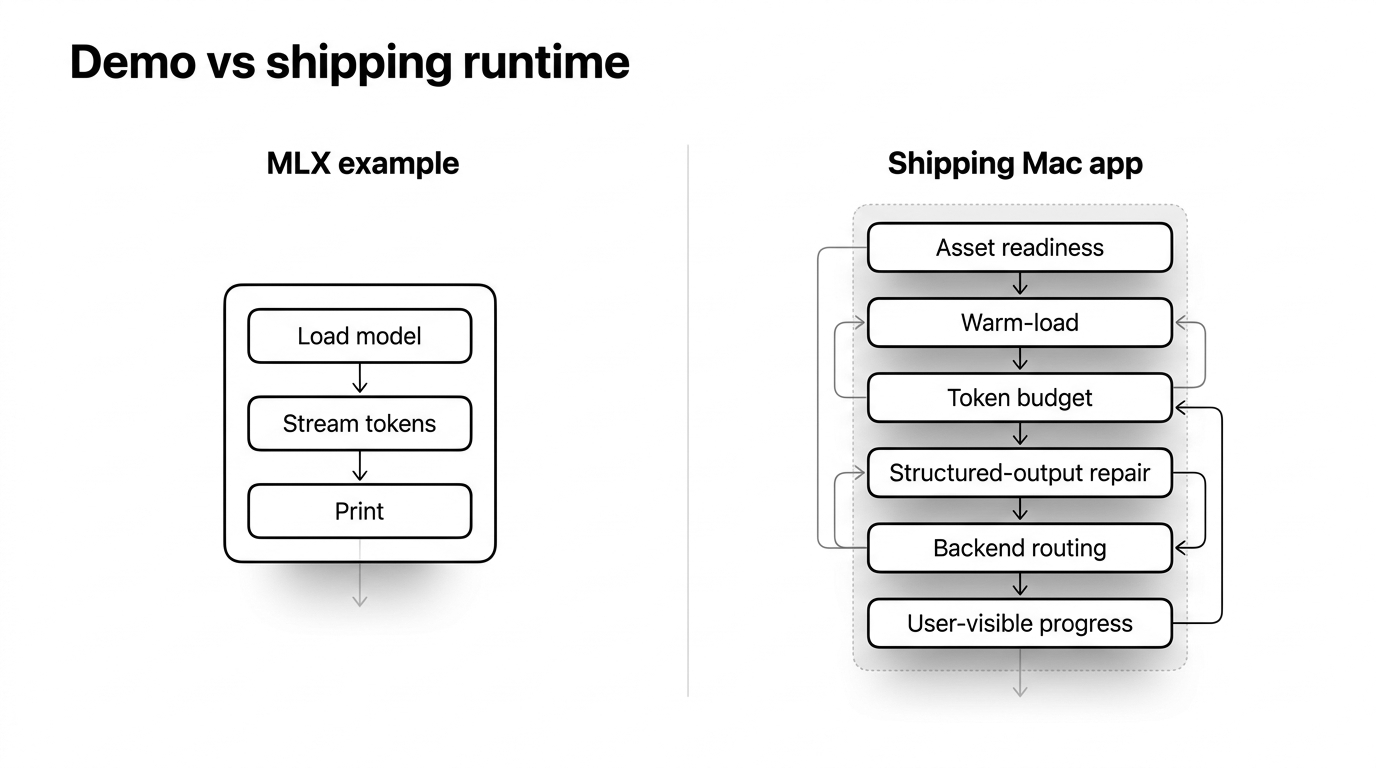
These are field notes from that stretch. I'm writing the runtime post I wanted when I started.
The mental model the docs skip
The architecture tripped me up, so here's the model I wish I'd had on day one.
Your binary stays small; your resident memory doesn't. Same lesson the delivery side taught me, seen from the other end. The weights aren't in your app bundle; Background Assets pulls them down separately and stores them outside your sandbox.
What grows is RAM at inference time, once the weights are on the GPU. For the generator that's roughly 2.6 GB of weights plus a KV cache that scales with the context window, about another gigabyte at an 8K context.
A small download number and a large resident number coexist. You should state both, because the disk cost is the one users notice and the memory cost is the one that crashes them.
I made the model-loading actor hold one model. In Narration Room, the object that loads weights is an actor around MLX-Swift's ModelContainer. I deliberately made that actor hold only one loaded model at a time.
The doc comment is there to make that rule visible: "Manages a single loaded model at a time. Calling warmLoad with a different directory unloads the current model first." This is app architecture, not an MLX-Swift rule.
The consequence is simple: that model-loading object cannot be shared casually. If you point the same object at a second model, it unloads the first; if you later ask it to run the first model again, it has to load that model from scratch. For more than one resident model, use more than one model-loading object and plan memory around that choice.
I made one layer apply the chat template. In Narration Room, feature code does not build the final prompt string. It sends the model-running layer a list of messages, each with a role like system, user, or assistant.
That layer is the only place that turns those messages into the model-specific prompt, using the chat template shipped with the model. That single formatting point matters because token counting and generation must format the conversation the same way; otherwise my budget math is quietly wrong.
Both paths call the model's applyChatTemplate, so token counting and generation see the same final prompt string, not just the same raw message text.
In my app, two model paths coexist. Apple's Foundation Models framework is the zero-download system path when SystemLanguageModel reports availability. The MLX path is the bigger, you-control-it option that costs 2.75 GB and a model load.
In Narration Room, both are available at the same time, and the app chooses per request which one runs. Once I stopped thinking "I have an LLM" and started thinking "I have two ways to generate text, with different costs and failure modes," the rest of the design fell into place.
The gotchas you actually hit at runtime
1. Structured output fails on the first try — and the retry won't save you
This one cost me the most, and it's the most important thing in this post.
I ask the model for JSON — a schema for the narration script — and it comes back failing validation:
Structured output validation failed on first attempt: The operation couldn't be
completed. (MLXStructuredOutputError error 1.)
"Error 1" sounds mysterious, but it only means decodingFailed: Swift is printing the enum case by number (invalidJSON is case 0, decodingFailed is case 1). The interesting part is what the model actually produced. A 3B model, asked for clean JSON, returns this:
{
  "speakers": [],
  "lines": [
    {"text": "A wide range of platforms and computer systems are used in this environment."},
    {"text": "Installation requires copying and pasting a text block into the agent's input."},
    {"text": "Yet, the agent's dependency on correct input remains an implicit assumption."
  ]
}
Two defects, and small models commit both constantly. First, it wrapped the whole thing in a Markdown json fence, despite a prompt that said "no markdown fences."
Second, look at the last line: it ran out of output budget mid-structure, so the final array element never gets its closing } before the ] arrives. That's not valid JSON, and the decoder rejects it: "The data couldn't be read because it isn't in the correct format."
The whole 853-character, seven-line response is thrown away over one missing brace.
Here's the honest part. The obvious fix was already in the code, and it didn't work. I already had a one-shot retry that re-prompts with a stricter instruction when validation fails:
do {
    return try validateResponse(response, structuredOutput: structuredOutput)
} catch is MLXStructuredOutputError {
    // The model didn't follow the schema. Retry once, stricter.
    let retrySystem = (wrappedSystem ?? "") + "\nRespond with valid JSON only. No other text."
    let retryRequest = makeRequest(prompt: wrappedPrompt, systemInstruction: retrySystem)
    return try validateResponse(try await collect(request: retryRequest),
                                structuredOutput: structuredOutput)
}
The system prompt already said "Output ONLY valid JSON." The retry said it again, louder. The model failed the same way the second time, because the failure isn't disobedience. It's a 3B model running out of tokens, and shouting the instruction doesn't add tokens. A retry costs you another full generation and lands you in the same place.
What worked was to stop asking the model to be perfect and to clean up the broken JSON before the decoder sees it. No LLM is involved. If the model stops in the middle of the last array item, the repair either drops that unfinished item or closes the missing braces. In the failure above, the fix is simply to add the missing } before the array's ].
That repair runs before decoding, and on the retry output too. The retry still exists, but it is no longer the only thing standing between a small formatting miss and a failed request.
Order matters. What I need is the whole JSON object, not just any valid JSON fragment inside it. The repair first tries to preserve that object by closing the braces that truncation left open. Only if that cannot recover the object do I use the looser fallback, which extracts a smaller complete fragment from the text. The important rule is not to let a partial fragment pass as a successful full answer.
I'll be honest about what this is: manual repair of raw model text, and that is not a clean abstraction. Two things make me comfortable shipping it anyway. It only fires when the normal parse fails, so a clean response never goes near it. And unlike the retry, it never calls the model again: there's no second generation to pay for, and the same broken output always repairs the same way.
The risk is plain: the repair only handles the failure shapes I have already seen. I keep it honest with fixtures built from those exact failures, so a known shape can't regress silently — but a brand-new one would still slip through. The deeper truth is that a 3B model is not a reliable JSON emitter.
If you need structured output from one, repair it at the point where raw model text becomes typed data instead of trusting the first attempt: repair, then retry, then fail loudly, in that order.
2. Model loading is its own state
Loading 2.75 GB of weights into memory takes real, perceptible seconds. If that happens on the first user request, the feature feels slow before generation has really begun. If you treat that time as invisible, the user experiences their first interaction with the feature as the feature being slow, and they blame the feature, not the loading.
So I made model loading its own step. The model-loading actor has a warmLoad method, and Narration Room calls it before it lets a request use MLX. The call is timed, so a slow load shows up in the logs — anything past 100 ms gets recorded.
A background load runs ahead of first use, so the weights are often already resident by the time the user triggers the feature.
3. Decide whether to even try — before you try
In Narration Room, whether to attempt the MLX model at all is a per-machine decision, tiered by RAM: the context window I can afford depends on how much memory the user has, because the KV cache grows with it.
static func defaultContextCap(ramGB: Int) -> Int {
    switch ramGB {
    case ..<16:  return 8_192
    case ..<24:  return 16_384
    case ..<32:  return 32_768
    // …rising with available RAM…
    default:     return 262_144
    }
}
Under my default policy, a 16 GB Mac gets a 16K context; a large machine gets the model's full 256K. From that cap I reserve output headroom, then derive how much input I can safely accept.
That cap is a performance choice as much as a memory choice. A larger maximum window does not make every request slow by itself, but a request that actually uses more of the window has more work to do: longer prompts mean more prefill, and a longer live history makes decoding heavier.
If the input is too large, generation never starts. The app throws an MLXInputOverflowError and shows a real message instead of starting work it can't finish: "Your source material is too long for on-device processing. Try shortening it."
The tradeoff is explicit, and it's the right one here. Once output headroom is reserved, that 16K context leaves a 16 GB Mac about 8K tokens for input, so some long inputs get rejected or chunked instead of run. I'd rather say that up front than let a user discover their RAM ceiling through an out-of-memory crash.
Foundation Models or MLX — and how I choose between them
The two model paths are good at different things, and the comparison is the actual decision.
Apple Foundation Models is the system path: no separate model download, no per-request API bill, and — the part I value most when it is available — genuinely reliable structured output through the @Generable macro. The schema is enforced by Apple's runtime rather than hoped for from a prompt.
You check SystemLanguageModel.default.availability == .available, open a LanguageModelSession, and go. The costs: you don't control the model or its guardrails, availability can simply come back unavailable, and the context window is small, with the on-device budget capped around 4,096 tokens.
The MLX path is the opposite set of tradeoffs. In Narration Room, I control the model, and I let the context window scale from 8K up to 256K with the user's RAM. I pay for that with a 2.75 GB download, model loading, a memory budget I manage myself, and structured output that, as gotcha 1 made painfully clear, is prompt-engineered free-form JSON I have to validate and repair.
Use Foundation for short, schema-shaped work where its reliability and zero footprint win. Reach for MLX when you need the larger context or the control, and you're willing to own the runtime cost.
In Narration Room, choosing between them happens in two phases, and the phases have deliberately different failure rules:
if useMLX {
    // Phase 1 — setup. Environmental failure (model files missing, load fails) falls back to Foundation.
    do { try await ensureMLXReady() }
    catch { return try await foundation.generateText(/* … */) }

    // Phase 2 — generation. The model is confirmed ready. No silent fallback; errors propagate.
    return try await mlx.generateText(/* … */)
}
return try await foundation.generateText(/* … */)
That is why I split the choice into two phases. Setup failures are environmental: the downloaded model files aren't there, or the load didn't take. Falling back to Foundation is the right, invisible response.
Generation failures are different. Once the model is confirmed loaded, errors propagate. Silently switching model paths mid-feature would hide real bugs and hand the user inconsistent output with no signal that anything changed. If the Foundation fallback also fails, that surfaces as its own distinct error rather than a generic one. Fall back on the way in; never fall back on the way out.
Production checklist
The things I check before I trust an on-device LLM in a build:
- Load the model before first use, and show that loading as its own step — don't let it masquerade as slow inference.
- For the single-occupancy model-loading object I use, keep one object per resident model; pointing one object at a second model evicts the first.
- Validate input against the RAM-tier budget and reject oversized prompts early, with a message that offers a real alternative.
- Structured output from a small model: repair deterministically, then retry once, then fail loudly. Never trust the first attempt.
- Phase-one setup may fall back to Foundation; phase-two generation does not silently fall back.
- State both the disk size and the peak memory in your user-facing copy.
- Count tokens through the same chat template your generation path uses, not a character heuristic.
Where the docs are still thin
I wouldn't have written this if the gaps hadn't cost me real days.
- The MLX-Swift examples stop at hello-world. Everything past "print the tokens" — explicit model loading, RAM-tiered budgets, choosing between model paths, structured-output recovery — you assemble yourself.
- The library's API moves. A version bump changed how you load a model: the newer MLX-Swift LM expects a tokenizer loader passed alongside the directory, and the old single-argument call was removed. You find that out by breaking, not by reading.
- Nobody tells you a small model needs deterministic structured-output repair, not just a retry. The retry is the obvious idea, and it's the one that doesn't work.
The framework is good. The path from example to production is mostly undocumented, so I wrote down the part I wish I had found when I started.
What's next
If this kind of field note is useful, the newsletter is the best way to catch the next one.