What Apple's Background Assets docs don't tell you
By Stefan Schmitt · 2026-05-20
Drafted with AI; researched, edited, and fact-checked by me — how I write.
The problem
One of the more surprising challenges in building Narration Room wasn't the AI itself — it was getting the model onto the user's device.
The app ships a 3.85 GB model: a 4-bit quantized 3B-parameter generator (about 2.75 GB) and a 0.6B-parameter guardian model in BF16 (about 1.1 GB). You can't bundle that into an app binary.
The obvious fallback is to download it on first launch with URLSession. That falls apart faster than you'd expect. Downloads die when the user backgrounds the app. There is no system-managed cache. Nothing gets cleaned up on uninstall. The user spends their first session staring at a spinner.
After 15 years on Apple platforms I assumed there'd be a well-trodden path here. There mostly is — it's called Background Assets — but the documentation leaves a lot unsaid.
Why Background Assets (and the alternatives I weighed)
I looked at four options for shipping a multi-GB model, and it's worth walking through how I reasoned about each.
URLSession in-app download. The first thing you reach for, and the first thing that bit me in prototyping. Downloads pause and never cleanly resume when the app gets backgrounded, the OS can reclaim a stalled download under memory pressure, you end up reinventing quota management, and the files linger after uninstall. Fine for something small. Wrong for 4 GB.
App Clips. I considered this briefly, then realised it's the wrong tool — App Clips are about launching a slice of your app from a link or tag, not delivering the main app's assets.
On-Demand Resources. Apple's older answer, and my read is that it's quietly being superseded for large-file cases. Background Assets is where Apple is putting its attention now.
My own server. Tempting, because I'd control everything. But it means a backend, auth, a CDN bill, monitoring, and bandwidth that scales with every install. More plumbing than the value justifies.
Background Assets won because it gave me a combination I couldn't get anywhere else. The system manages the download lifecycle: it survives app kills and resumes across reboots. With Apple-hosted packs, Apple handles the hosting path, so I don't run my own CDN for every install. Uninstall cleans up after itself. There is no per-user infrastructure to run.
The cost is a steeper learning curve and a more invasive integration. For multi-GB models on Apple devices in 2026, I don't think anything else competes.
The mental model the docs don't give you
The architecture is the part that tripped me up, and most explainers skip it. Here's the model I wish someone had drawn for me on day one.
You don't have one process. You have two. Your main app and a small extension — a separate target, with its own bundle identifier and entitlements — cooperate to deliver assets. The extension adopts Apple's StoreDownloaderExtension protocol, and that's the piece that lets the system call into your code when it's time to download. Your app never kicks off a download directly. The system triggers the extension, and the extension decides whether to proceed.
The two talk through a shared app-group container. Downloads land there; your main app reads from there. The part that took me a while to internalise: the extension's lifecycle belongs to the OS, not to your app. It can run when your app isn't even open. Downloads keep going across app kills, across reboots, across Wi-Fi drops.
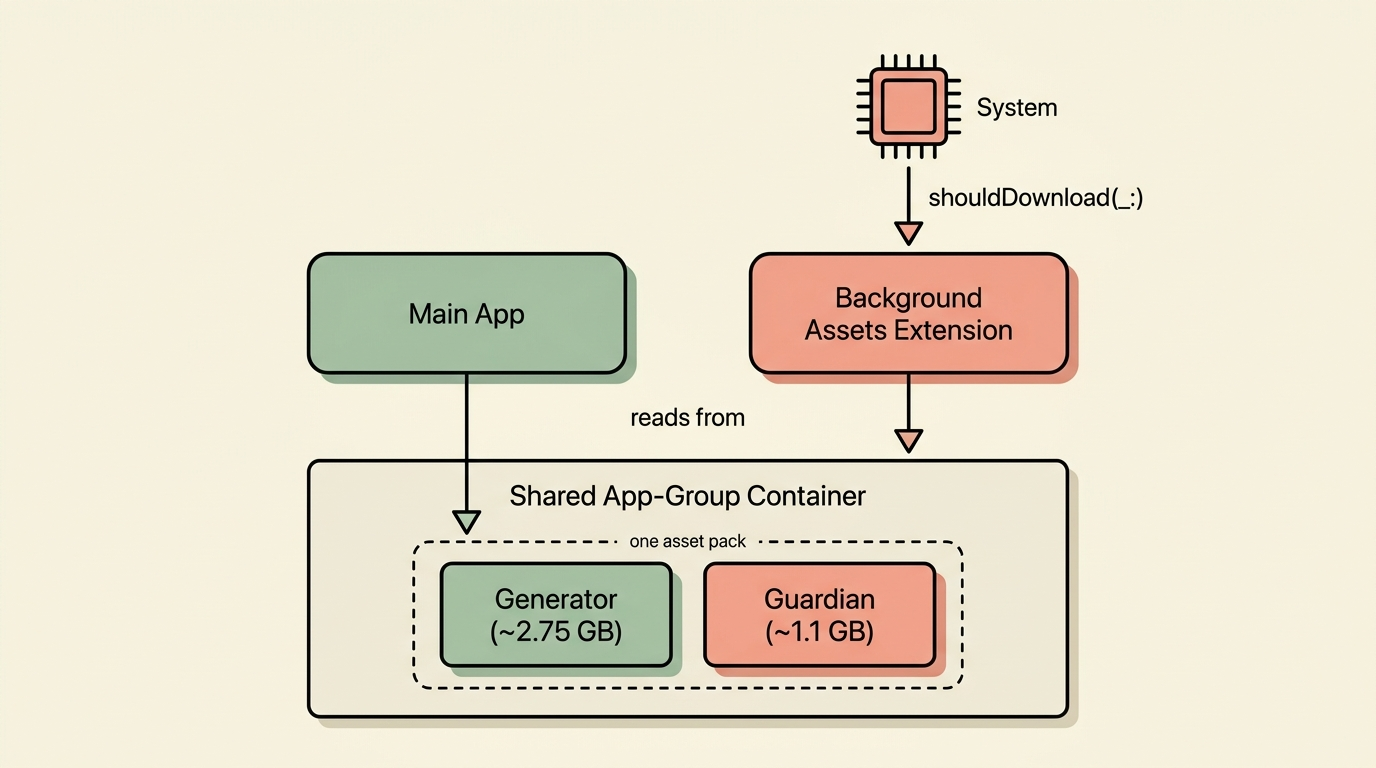
Once that clicked, everything else got easier. The shift is from "my app downloads a file" to "the system manages a file, and my app subscribes to its state."
The gotchas you actually hit in production
1. The dependent-pack trap — and why one pack often beats two
Narration Room needs two models working together: the generator that writes the narration, and the guardian that screens what goes in and what comes out. My first instinct was the tidy one — two asset packs, one per model, each versioned on its own.
That was wrong, and it took thinking through the failure cases to see why. The moment a user ends up with one model but not the other, or mismatched versions of each, the moderated path breaks. And with two independent downloads, that broken state is reachable.
So I pack them together — one asset pack, both models, declared with multiple fileSelectors in the manifest:
{
    "assetPackID": "app-models",
    "downloadPolicy": {
        "onDemand": {}
    },
    "fileSelectors": [
        { "directory": "Models/Generator-3B-Instruct-4bit" },
        { "directory": "Models/Guardian-0.6B-BF16" }
    ],
    "platforms": ["macOS"]
}
The tradeoff is real: to update either model, the whole 3.85 GB redownloads. For me that's the right call — guaranteeing both models are present and in sync at install time matters more than independent update streams. If your two models drift on very different schedules, separate packs might be worth it. But then you owe yourself a real story for "generator present, guardian missing," and I'd rather not write that code.
2. The AAR archive format (which the docs barely document)
Asset packs are .aar files — Apple Asset Archives. You build one with xcrun ba-package from a JSON manifest like the one above, and multiple directories go into a single archive that extracts atomically.
The atomicity is the quiet win. There's no half-extracted state where you have some of the generator and none of the guardian. It's all on disk, or none of it is.
Inside, it's just the model files you'd expect — .safetensors, config.json, tokenizer.json, the usual tokenizer companions, sometimes a .jinja chat template. The AAR is only the wrapper.
3. ASC upload and processing time is longer than you think
This one caught me off guard. After ba-package builds the archive, you upload it to App Store Connect, and then Apple processes it asynchronously before it's downloadable. So you have to plan for async — don't tie your release date to a same-day turnaround.
I'll be honest: I never pinned down an exact processing time, and that still bothers me a little. It varies, and Apple doesn't publish a number.
What I can tell you is to upload early and poll the status rather than block on it. The asc CLI and the App Store Connect API both work. If you're sprinting toward a launch, the asset-pack queue is exactly the kind of thing that quietly costs you a day.
4. App Review rejection risk — Guideline 2.1
This is the one that actually worried me. Apple's Guideline 2.1 (App Completeness) wants apps to demonstrate full functionality during review. Picture the reviewer tapping Generate and getting a "download to use" prompt instead of a working feature — that reads as incomplete, and it can get you rejected.
The fix is to submit the asset packs for review with your build, and to actually confirm they show up in the submission rather than just sitting uploaded. Asset packs have their own review track (up to ten per submission), and they need to clear it before external users can pull them.
What worked for me:
- Upload the binary and the packs in the same submission.
- Check that both appear under "Items to Review" before sending it off.
- For anything high-risk, consider flipping the pack's policy from
onDemandtoprefetchso the model is already there when the reviewer — or the user — first opens the feature. You pay upfront bandwidth; you get a reviewer who sees the thing actually work.
Internal TestFlight testers can use unreviewed packs right away, which made dogfooding painless. External testers and App Store users wait for review.
5. The consent → download → warmup → use UX flow
The first cold launch of an AI feature has four distinct states, and I learned the hard way that blurring them confuses people:
public enum ModelAssetState: Sendable {
    case notDownloaded
    case downloading(progress: Double)
    case ready(URL)
    case failed(Error)
}
Each one gets its own UI:
- Not downloaded — an explicit opt-in. I don't auto-download; I tell the user the size and what they get for it.
- Downloading — progress and a cancel option, and crucially the download has to keep surviving the user leaving the screen. The view doesn't own it; the system does.
- Ready — feature unlocked.
- Failed — a real error with a retry.
There's a fifth state most write-ups skip, and it surprised me: warmup. Loading a 2.75 GB model into GPU memory takes real seconds even once the file is local, and cold inference latency is rough. I run a warmup pass on first use and show it as its own step. Skip it, and users blame the feature for being slow when it's really just loading.
6. The URL-lifetime constraint nobody mentions
Here's the one that cost me half a day, and I'm still a little annoyed it isn't documented. When you ask the framework where a downloaded asset lives, you get a URL back — and that URL is only valid for the current process. Don't cache it. Don't write it to UserDefaults. Don't hand it to a background task that outlives the process.
The pattern that works: resolve it fresh on every launch, then pass it to whoever needs it.
That constraint pushed me toward a design I'm genuinely happy with — and it's the same instinct I lean on everywhere now, which is to factor concerns into their own packages early. One package resolves the asset and hands back a fresh URL; another package accepts that URL and runs inference. The app composes the two, so the URL-lifetime rule stays on the asset side.
public protocol ModelAssetManaging: Sendable {
    func ensureAvailable(for descriptor: ModelAssetDescriptor) async throws -> URL
    func updates(for descriptor: ModelAssetDescriptor) -> AsyncStream<ModelAssetState>
}

// Runtime accepts a URL; it does not know how the URL was resolved.
public protocol ModelRuntime: Sendable {
    func warmLoad(modelDirectory: URL) async throws
    func generate(_ request: GenerationRequest) async throws -> AsyncThrowingStream<Token, Error>
}
This is the kind of separation you appreciate later. The day the URL constraint bites, the fix lives in exactly one place.
7. Download continuity when the initiating UI disappears
A question I had early: if the user opens Settings, starts the download, and closes Settings — does it keep going?
It does. The extension owns the download, not the view that started it. The system pauses and resumes it across launches and even reboots. A user can quit the app entirely and come back the next day to a finished download. Your UI just needs to handle reattaching to an in-progress download instead of starting a fresh one.
The extension itself is almost nothing:
import BackgroundAssets
import ExtensionFoundation
import StoreKit
import OSLog

@main
struct DownloaderExtension: StoreDownloaderExtension {
    private static let logger = Logger(
        subsystem: "com.example.app.BackgroundAssetDownloader",
        category: "AssetDownload"
    )

    func shouldDownload(_ assetPack: AssetPack) -> Bool {
        Self.logger.info("Evaluating download for asset pack: \(assetPack.id)")
        return true
    }
}
shouldDownload(_:) is where I would check conditions before allowing a download — free disk, on Wi-Fi, a consent flag in shared defaults. I return true, because the consent conversation already happened in the app before the user could trigger any of this.
8. Be careful what "on-device" promises
I had to catch myself on the marketing here. It's tempting to write "no internet required." I'd resist it.
The user needs the network at least once, to pull the model down. Depending on how your app routes its harder requests, there may be paths that reach out later too. So I say what's actually true: the model downloads once, then does its work on your Mac. I don't claim "fully offline," because for most real apps that's a sentence you can't completely stand behind.
A mismatch like that — "offline" on the box, a multi-GB download on first run — is exactly the kind of thing that turns into a one-star review. Precise copy is the version that holds up.
9. Pre-publication: attach asset packs to TestFlight
Asset packs live separately from your binary in App Store Connect — uploaded on their own, processed on their own, with their own review state.
Internal TestFlight testers can use a pack once it finishes processing — no App Review needed — which makes internal builds the fastest way to test the real download flow on a device. External testers and App Store users wait for review. Ten packs max per submission, which for one or two models is plenty.
10. Your IPA doesn't grow — but resident RAM does
I kept conflating two numbers early on, and they're worth separating. "My models are 4 GB, so my app is 4 GB" — not true. With Background Assets the IPA stays small; users only pay the disk cost if they opt in, and the OS stores it outside your sandbox.
What does grow is resident RAM at inference time. The generator (4-bit, ~2.6 GB resident) plus the guardian (BF16 at 8K context, north of 1.1 GB) peak around 4.9 GB. Fine on a 32 GB Mac. Tight on 16 GB. Out of reach on an 8 GB iPad. I state both the disk and RAM minimums in the App Store description - the disk number is obvious, the RAM number isn't, and I'd rather a user know than discover it through an out-of-memory crash.
Local development with the mock server
If I could share only one practical thing from all of this, it's this.
Without a mock, every iteration round-trips App Store Connect — minutes to hours per cycle. That's unworkable. Apple ships xcrun ba-serve, and almost no tutorial mentions it:
# serve your local asset packs over HTTPS, then point the debug build at them
xcrun ba-serve --host localhost --choose-identity-automatically
xcrun ba-serve url-override https://localhost:<port>
Point your debug build at the local server, iterate against it, and only push to ASC once the behavior is right. This is what turned Background Assets from "submit and pray" into something I could actually develop against.
Production checklist
The things I check before submitting:
- Asset packs uploaded and processed in App Store Connect (verify status; don't just submit).
- Asset packs included in the same submission as the app binary, or pre-approved separately.
- App-group entitlement matches between the main app and the extension.
- The extension's
Info.plistdeclaresEXExtensionPointIdentifier=com.apple.background-asset-downloader-extension. - Tested on a clean device — not the dev machine with cached assets. Cold-start is what matters.
- All four download states (not-started, downloading, paused/failed-with-retry, ready) exercised.
- Warmup runs, and is visibly distinct from the download.
- Marketing copy says "one-time download," never "no internet."
- App Store description states minimum disk and minimum RAM.
- Internal TestFlight build smoke-tested with the pack.
- External TestFlight build tested after the pack clears review.
Where Apple's docs are still wrong or absent
I wouldn't have written this if the docs were complete. The gaps that cost me the most:
xcrun ba-serveis barely mentioned, and the iteration workflow it unlocks is the single most useful practical fact about the framework.- The dependent-pack atomicity pattern is left as an exercise. You learn it by burning a release.
- The URL-lifetime constraint is silent in the API surface, and it's a quiet crash source.
- ASC upload and processing time has no published estimate; plan for hours.
- Guideline 2.1's implications for not-yet-downloaded packs aren't documented anywhere I could find — you discover them at review time.
- The macOS-versus-iOS delivery differences deserve their own write-up.
The framework itself is good. The documentation needs help, and the community needs more write-ups from people actually shipping with it — which is the only reason I wrote this one down.
What's next
If this kind of field note is useful, the newsletter is the best way to catch the next one.